
Hello World. Why I built Readit
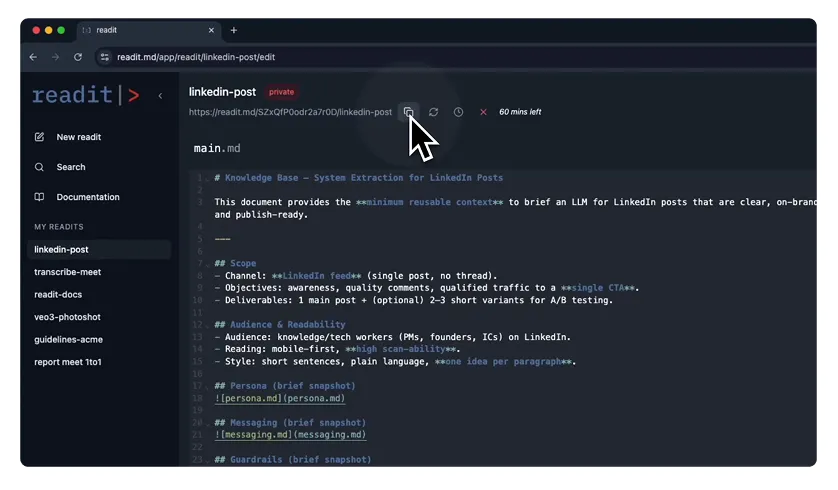
I have a folder on my desktop. Or rather, I had a folder.
It was full of text files named python-guidelines.txt, react-setup.txt, api-docs-v2.txt.
Every time I started a new chat with ChatGPT or Claude for a project, I did the same ritual: open the file, select all, copy, switch tab, paste.
Then, inevitably, the project would change. The API would update. I’d update the text file on my desktop, but I’d forget to update the one on my laptop. Or my colleague would ask for the prompt, and I’d Slack them a stale version.
I realized I didn’t have a “prompt problem.” I had a context management problem.
That’s why I built Readit.
The problem with static text
Section titled “The problem with static text”We treat AI context like static text, but it shouldn’t be. Context is dynamic.
Sometimes you need the current date. Sometimes you need to include a specific library documentation only if you are working on a specific feature. Sometimes you need to reference a file that lives somewhere else.
Static pastebins or Gists weren’t enough. I needed something programmable.
Enter Readit
Section titled “Enter Readit”Readit is a simple idea: Context as a URL.
Instead of managing scattered text files, you create a “Readit”—a collection of Markdown files. You get a public (or private) link. You give that link to the AI.
But here is the kick: it’s not just serving a file.
Readit runs a Liquid templating engine before serving the markdown.
This means your context can be alive:
-
Variables: Inject {{ now }} or project metadata automatically.
-
Logic: Use {% if %} statements to show or hide sections of instructions based on variables.
-
Transclusion: Embed other files inside your main context using
. You can have a master “Company Guidelines” file and embed it into every project’s specific context. Update the master, and everything updates.
Built for Developers
Section titled “Built for Developers”I built Readit because I needed it for my daily workflow. I didn’t want a bloated SaaS with complex integrations. I wanted a utility.
The stack reflects this philosophy. It’s built on Node.js, TypeScript, and Fastify because I wanted low overhead and speed. The frontend is React, and the backend relies on Postgres to handle the data structures (and yes, I’m working on pgvector integration to bring semantic search to your docs soon).
And, of course, a lot of coffee went into the late-night coding sessions to get the recursion logic right.
Try it out
Section titled “Try it out”Readit is live. You can create your first context right now.
It’s free, and I’m building it in the open.
If you want to see it in action without creating an account, you can use Readit to learn about Readit.
-
Copy this URL: https://readit.md/gi0wQgl6GoFx37MY/readit-docs
-
Paste it into ChatGPT, Claude, or Gemini.
-
Ask: “Based on the docs, how does the file embedding work?”
I hope this saves you as many Ctrl+C / Ctrl+V keystrokes as it saved me.
Happy coding.